PACS Server Specs: Hardware Sizing for Radiology Teams
PACS server sizing guide: CPU, RAM, NVMe vs NAS storage tiers, and 25-year statutory retention calculations under Permenkes 24/2022 for imaging teams.
Quick answer
What to know before reading further
- PACS servers demand high-throughput storage IOPS for rapid binary DICOM ingestion and ample RAM for real-time web viewer transcoding.
- Structure storage into Hot Storage (NVMe SSDs for active examinations within 30 days) and Cold Storage (Enterprise NAS or S3 cloud archives for 25-year statutory retention).
A radiology server is not an ordinary office file share
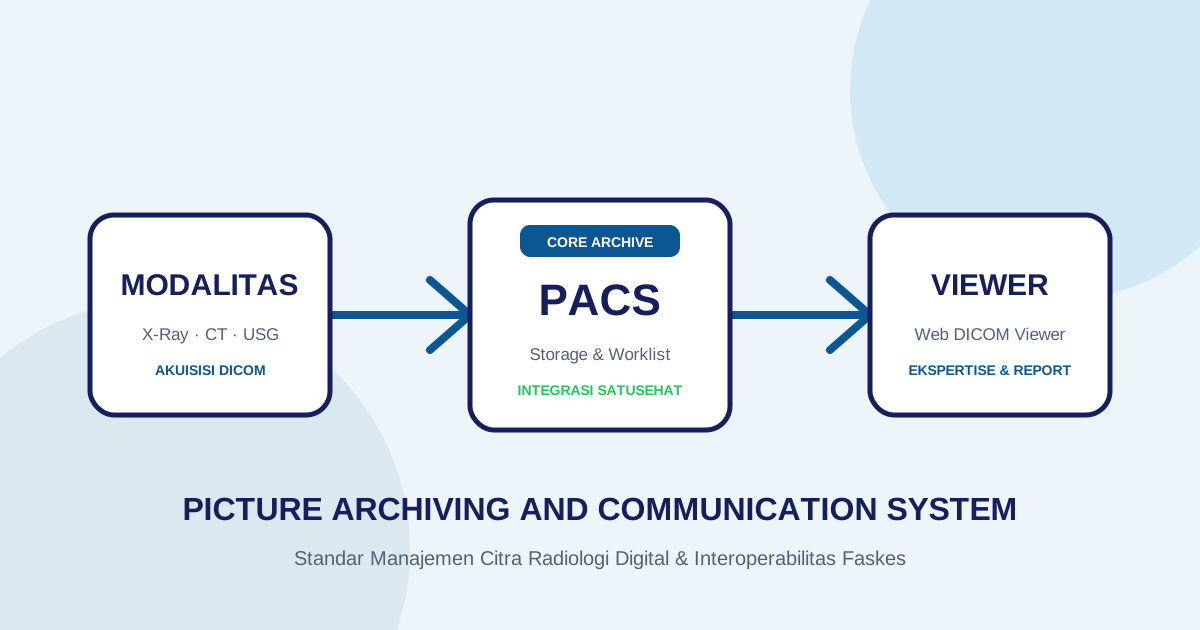
One of the most frequent misconceptions encountered during radiology digitization is assuming that a Picture Archiving and Communication System (PACS) server behaves identically to standard office network shares. IT procurement teams frequently repurpose consumer desktop towers or entry-level servers with standard desktop hard drives, subsequently wondering why viewing workstations freeze or why multi-slice CT transmissions choke during peak clinical hours.
Medical imaging data formatted under the DICOM standard exhibits distinct workload characteristics:
- Intensive Burst I/O Ingestion: Upon completing an examination, modern CT scanners transmit hundreds to thousands of uncompressed
.dcmimage slices simultaneously via C-STORE protocols directly to the server port. - Real-Time Web Transcoding: Modern zero-footprint web viewers do not download full multi-gigabyte raw studies to browser clients. Instead, the server dynamically renders image matrices into web canvas streams in response to radiologist windowing (WW/WL — Window Width/Window Level, the contrast and brightness adjustment), zoom, and pan commands.
- Statutory 25-Year Legal Retention Mandate: Under Indonesian Ministry of Health Regulation (Permenkes) No. 24 of 2022 on Medical Records, healthcare facilities are legally mandated to retain Electronic Medical Records (specifically including diagnostic imaging DICOM files) for a minimum of 25 (twenty-five) years from the date of the patient’s last visit. This regulation supersedes previous frameworks (Permenkes No. 269/MENKES/PER/III/2008) which only stipulated a 5-year retention window.
This guide details how healthcare IT teams should calculate storage capacity (sizing), specify server hardware, and design reliable local PACS storage architectures.
1. Storage Sizing Calculation Framework (5-Year Hardware Cycle vs 25-Year Retention)
Before investing in disk arrays, calculate the estimated annual imaging volume generated across your facility’s specific modality inventory:
| Imaging Modality Type | Average Study Size | Monthly Patient Volume | Estimated Annual Accumulation |
|---|---|---|---|
| Digital Radiography (CR/DR) | 25 MB – 40 MB (2–3 views) | 400 patients | ~180 GB / year |
| Medical Ultrasound (US) | 15 MB – 50 MB | 200 patients | ~80 GB / year |
| CT Scanner (16–64 Slice) | 250 MB – 800 MB | 150 patients | ~900 GB / year |
| Multi-slice CT (>128 Slice) | 800 MB – 2.0 GB | 100 patients | ~1.6 TB / year |
| Magnetic Resonance Imaging (MRI) | 200 MB – 600 MB | 80 patients | ~400 GB / year |
Practical Storage Sizing Formula:
Total 5-Year Net Capacity = (Total Annual Volume Across Modalities) × 5 × 1.3
The 1.3 buffer multiplier accounts for SQL database indexing, thumbnail previews, audit logs, and OS headroom. For example, a community hospital operating 1 digital X-ray, 1 ultrasound unit, and a 16-slice CT scanner produces roughly 1.2 TB annually. Over the initial 5-year hardware cycle, the facility must provision at least 7.8 TB of net usable storage, accumulating toward ~35–40 TB across the statutory 25-year retention lifespan.
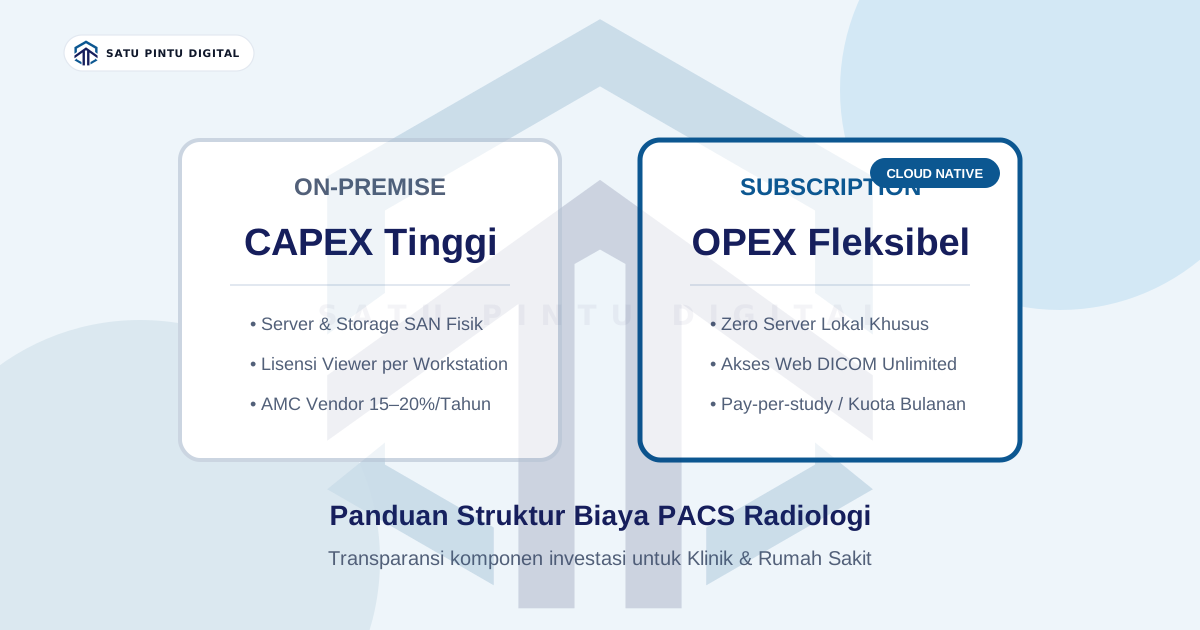
Hosting 25 years of imaging accumulation entirely on on-premise local hard drives creates exponential hardware upgrade costs. This makes tiered storage architectures and cloud archival integration essential.
2. Implementing Tiered Storage Architectures
Purchasing a full 10 TB array composed exclusively of enterprise NVMe SSDs quickly exhausts departmental budgets. Conversely, relying solely on mechanical hard drives degrades image retrieval speeds, creating bottlenecks in emergency departments.
The industry-standard solution is Tiered Storage:
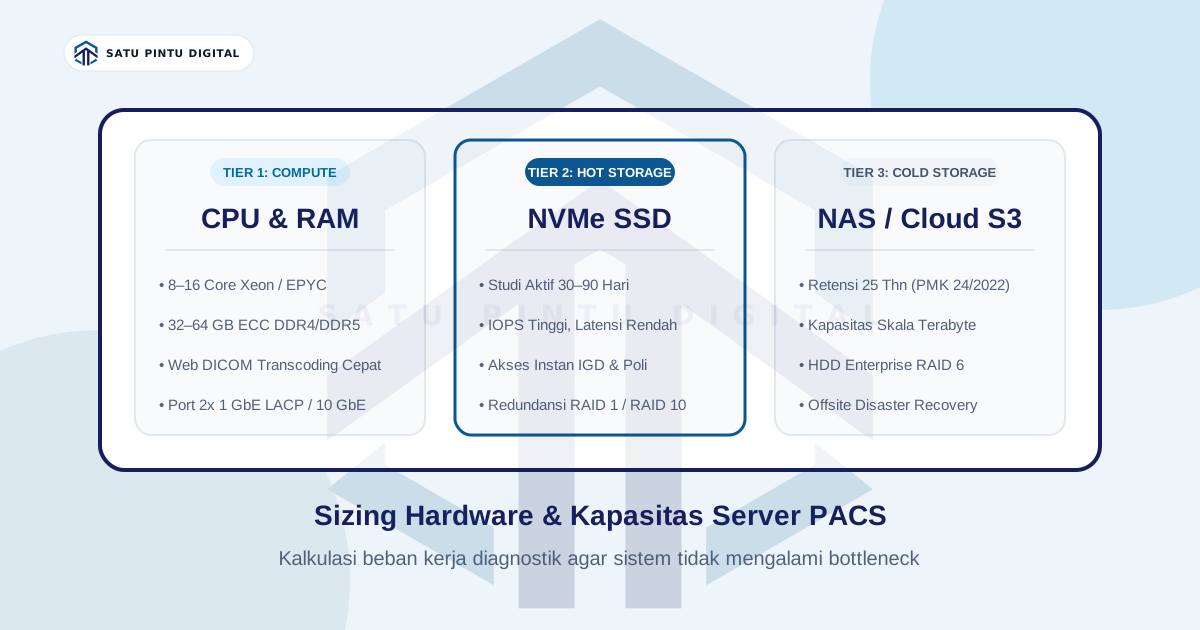
Tier 1: Hot Storage (NVMe / Enterprise SATA SSDs)
- Role: Houses active examination data from the most recent 30 to 60 days.
- Performance: Delivers sub-millisecond seek latencies and tens of thousands of random read IOPS. Emergency clinicians and on-duty radiologists retrieve current patient studies instantly without rendering lag.
- RAID Strategy: Implement RAID 1 (mirroring) or RAID 10 to guarantee uninterrupted clinical operation even during disk failure.
Tier 2: Cold Storage (Enterprise HDD Arrays / NAS / Object Storage)
- Role: Archives historical studies older than 60 days through the completion of 25-year statutory retention windows under Permenkes No. 24 of 2022.
- Performance: Employs high-density enterprise mechanical drives (e.g., 4x 8 TB Seagate IronWolf Pro or WD Red Pro) configured in RAID 6 (surviving two concurrent disk failures).
- Automated Lifecycle Migration: The PACS server automatically migrates studies older than 30 days from Hot Storage to Cold Storage while maintaining transparent database indexes.
3. Recommended Hardware Specifications for On-Premise Servers
For healthcare institutions establishing standalone on-premise PACS infrastructure, the following hardware configurations ensure stable performance:
A. Processor (CPU)
- Outpatient Clinics / Small Hospitals (1–2 modalities): Minimum 6–8 Cores (Intel Xeon E-2300 series or AMD EPYC 4004 series).
- Mid-Sized to Tertiary Hospitals (Multiple CT/MRI units): Minimum 12–16 Cores / 24 Threads (Intel Xeon Silver 4300 series or AMD EPYC 7003 series). Ample processor cores are vital to handle real-time JPEG2000 decompression and simultaneous multi-user web rendering.
B. Memory (RAM)
- Capacity: Minimum 32 GB ECC DDR4/DDR5 (clinics) or 64 GB – 128 GB ECC (hospitals).
- Critical Role of ECC: Server memory must incorporate Error-Correcting Code (ECC) architecture to prevent silent memory bit-flips from corrupting diagnostic pixel data.
C. Network Interface Cards (NIC)
- Avoid outdated 100 Mbps interfaces.
- The server must feature at least 2x 1 GbE ports configured with Link Aggregation (LACP), or 10 GbE SFP+ connectivity if processing high-frequency multi-slice CT streams from acquisition rooms.
4. Redundancy and Disaster Recovery Protocols
Local on-premise storage remains inherently vulnerable to physical hazards: electrical surges, storage controller failures, or malicious ransomware encryption.
Mandatory baseline safeguards include:
- Online Double-Conversion UPS: PACS servers must be backed by a True Online UPS (1500–3000 VA) to protect database integrity against sudden power interruptions.
- The 3-2-1 Backup Strategy:
- 3 Total copies of patient data: 1 active Hot Storage instance, 1 local Cold Storage mirror, and 1 offsite copy.
- 2 Distinct storage media formats: Local enterprise SSDs and external NAS / Cloud Object Storage.
- 1 Offsite geographic location: Encrypted off-premises replication (such as S3-compatible cloud archival) to guard against facility-level physical disasters.
Conclusion
Engineering an on-premise PACS server requires balancing storage volume, disk I/O throughput, hardware redundancy, and statutory medical retention compliance. Without tiered storage architectures, healthcare providers risk overspending on hardware that quickly encounters performance bottlenecks.
For clinics and hospitals seeking to bypass physical server procurement, RAID maintenance, and disaster recovery complexity, cloud-native PACS platforms offer a modern alternative that eliminates on-premise server maintenance entirely.
Imagestro-PACS operates on a cloud-native architecture that manages compute scaling, automated multi-tier storage, and geographic data redundancy without requiring dedicated server hardware at your facility. Discover how cloud PACS simplifies medical imaging infrastructure via the Imagestro-PACS free tier.
Key terms
Quick glossary
- IOPS
- Input/Output Operations Per Second — a benchmark metric indicating how many individual read/write operations a storage disk can execute each second.
- Hot Storage
- Ultra-fast storage tiers (NVMe/Enterprise SSD) designated for active clinical examinations frequently viewed by attending radiologists.
- Cold Storage
- High-capacity, cost-effective storage media (Enterprise HDDs or S3 Object Storage) for archiving historical imaging studies rarely retrieved.
- Lossless Compression
- Mathematical data compression algorithms that reduce DICOM file sizes without discarding a single pixel of clinical diagnostic data.
Read the sources
References and documentation
- Indonesian Ministry of Health Regulation (Permenkes No. 24 of 2022) on Medical Records Official text of Permenkes No. 24 of 2022 (Indonesian regulations database, JDIH BPK RI) mandating a minimum 25-year retention period for electronic medical records.
- RSNA Guidelines for PACS Infrastructure & Storage Sizing Technical guidelines for computing specifications, tiered storage architectures, and network bandwidth planning in medical imaging.
- DICOM File Format and Compression Specifications (NEMA) Technical specifications for JPEG 2000 Lossless compression and DICOM storage I/O performance models.
Frequently asked
Questions teams ask before implementation
- Why do standard file servers struggle when utilized as a radiology PACS server?
- DICOM imaging studies consist of thousands of high-resolution binary slices. Conventional office file servers are optimized for sequential small document access, not intensive burst throughput and concurrent multi-user web image rendering.
- How long must radiology data be retained legally and what storage is required?
- Under Indonesian Ministry of Health Regulation (Permenkes) No. 24 of 2022 on Medical Records, Electronic Medical Records (including DICOM imaging) must be preserved for at least 25 years from the patient's last visit. A mid-sized hospital requires ~7.8 TB for the initial 5 years, accumulating up to 35–40 TB over 25 years.
- Is ECC RAM mandatory for clinical PACS servers?
- Strongly recommended. Error-Correcting Code (ECC) memory eliminates memory bit-flips, ensuring medical imaging binaries and patient diagnostic metadata are not silently corrupted during RAM processing.
Transmit Radiology to SATUSEHAT Without the Setup Hassle
Connect your clinical imaging workflow—from modality worklists and automated accession numbers to web DICOM viewing and SATUSEHAT synchronization. Free Tier available for clinics and hospitals.
Content cluster